 |
|
|
| |
 |
|
[Math+Magic]™ Pro Edition for Adobe InDesign for Windows
|
|
MathMagic Pro Edition v8.9 for Adobe InDesign
with MathMagic Plug-ins for InDesign
New CC 2023 (64-bit versions)
CC 2022 (64-bit versions)
CC 2021 (64-bit versions)
CC 2020 (64-bit versions)
CC 2019 (32-bit & 64-bit versions)
CC 2018 (32-bit & 64-bit versions)
CC 2017 (32-bit & 64-bit versions)
CC 2015 (32-bit & 64-bit versions)
CC 2014 (32-bit & 64-bit versions)
CC (32-bit & 64-bit versions)
CS3, CS4, CS5, CS5.5, CS6
Date of Release: Nov-18-2022
|
|
Thank you for choosing MathMagic, the ultimate equation editor on the planet!
MathMagic Pro Edition for Adobe InDesign is an equation editor mainly for use with Adobe InDesign software in editing any mathematical expressions and symbols with WYSIWYG interface and various
powerful features.
|
|
|
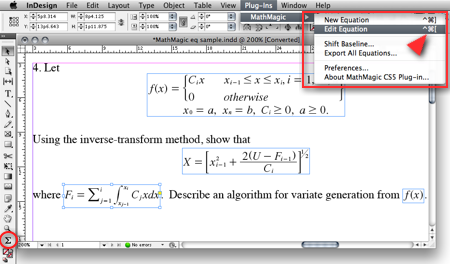
(InDesign window and menubar with MathMagic Plug-in menu)
|
|
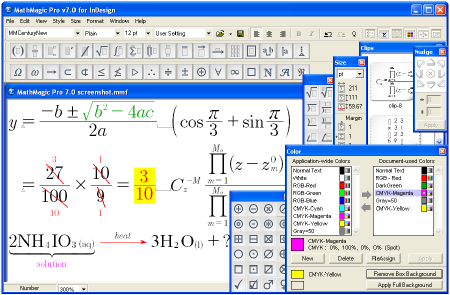
(MathMagic Main Editor window)
|
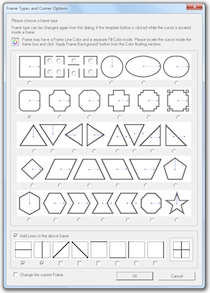
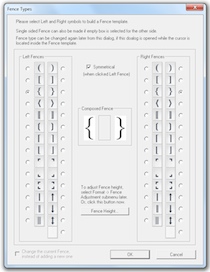
(Frame and Border Types) (Vertical Fence Types)
|
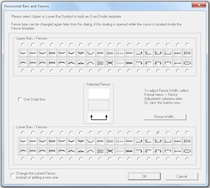
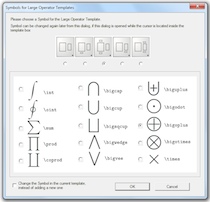
(Horizontal Fences, Decor Shapes) (Large Operator Symbols)
|
| * What's New (v8.9 - November 18, 2022) |
- Added: Supports Adobe InDesign CC 2023.
- Added: Some more fonts added for SVG embedding.
- Fixed: SVG drawing improved for a few templates.
- Fixed: Communication issue with InDesign CC 2023.
InDesign Plug-ins :
- Added: MathMagic CC2023 plug-in added for Adobe InDesign CC 2023.
|
For the full history of changes, please read the Version History file.
|
|
|
* How to Install
|
- Please read below (How MathMagic Pro works - 1. Installing) for more details.
- If installing on Windows XP,
- Download the latest Installer from download page
- Double click on the installer icon to proceed the installation
- Install MathMagic Plug-in manually, Set the path in the Preferences dialog. (read below)
- Launch MathMagic application from Windows Start menu or from the following location:
\Program Files (x86)\MathMagic Pro Edition\
|
- If installing on Windows Vista or newer,
- Download the latest Installer from download page
- Double click on the installer icon to proceed the installation.
- Install MathMagic Plug-in manually, Set the path in the Preferences dialog. (read below)
- After installation, select MathMagic application from the following location:
\Program Files (x86)\MathMagic Pro Edition\
- Right-click on it, select 'Properties'.
- Select "Windows XP SP3" compatibility mode, and turn on "Run as an Administrator" privilege.
(This is to make MathMagic read/write Registry correctly. Otherwise, Registry error message might be displayed.)
- Then, launch MathMagic application.
|
- How to install MathMagic Plug-in
- If running on Windows 7, 8 or Windows Vista, please set the Properties of your InDesign application first. This is to make InDesign appplication can talk to the external MathMagic Pro application and also let MathMagic Plug-in save the Preferences file correctly.
- right-click on InDesgin CCx.exe application, select 'Properties', from
\Program Files\Adobe\InDesign CCx.exe
- Select "Windows XP SP3" compatibility mode, and turn on "Run as an Administrator" privilege.
- The correct version of MathMagic plug-in should be manually installed by copying from
\Program Files (x86)\MathMagic Pro Edition\Plug-ins\ folder
to \Adobe\InDesign CCx\Plug-ins\ folder.
* The whole plug-in folder of "MathMagic CC20xx" should be copied, instead of copying files from inside the "MathMagic CC20xx" folder.
(If for InDesign CC2019 or older with 64-bit InDesign,
"MathMagic CCxxxx-64bit" plug-in folder should be installed, instead of 32-bit of "MathMagic CCxxxx" folder. If InDesign CC2020 or newer, only 64-bit plug-ins available.)
- Then, set the path to MathMagic Pro v8.8 InD.exe application, from the
InDesign menubar -> Plug-ins -> MathMagic -> Preferences... dialog: Click "Find" button.
|
|
|
|
|
1. Installing
- Install MathMagic Pro for InDesign for Windows using the latest MathMagic Pro installer.
- Manually install MathMagic plug-in in the following location.
- copy "MathMagic CC" or "MathMagic CSx" folder itself from
\Program Files (x86)\MathMagic Pro Edition\Plug-ins\ folder
- and paste(or simply drag&drop) it into your
\Adobe InDesign CC folder\Plug-ins\ folder
or \Adobe InDesign CSx folder\Plug-ins\ folder
- Then, launch your InDesign application. Once the MahgMagic plugin is installed and loaded correctly, you should see.
InDesign menubar -> Plug-ins -> MathMagic sub menu.
- Then, please choose : InDesign menubar -> Plug-ins -> MathMagic -> Preferences dialog: click "Find" button to select the path to the external MathMagic Pro application, which is typically
\Program Files (x86)\MathMagic Pro Edition\MathMagic Pro 8.x InD.exe
- Then, all your initial setting should be done if you are running Windows XP.
- If running on Vista or Windows 7, please read above (* How to Install) to set the Admin setting in the Properties window of both MathMagic Pro application and InDesign appliation.
- Please read the License email or ReadMe First file for more information, located in
\Program Files (x86)\MathMagic Pro Edition\ folder
2. Creating Equations
- Launch Adobe InDesign application(CSx or CCx).
- Make a new InDesign document
or open a document.
- Select the Plug-ins menu
-> MathMagic sub-menu.
- Choose "New Equation" item
to create an equation.
If the cursor is located in the text box,
the equation will be inserted in the cursor
position as an In-Line Graphic(ILG). Otherwise,
the equation will be placed as an EPS
graphic on where you click the mouse.
- You may select the Sigma
tool button from the floating main toolbar
to create an equation box, and then drag
a rectangle in the document to specify
the location of an equation once created
by the external MathMagic Pro.
- You may also right button click while the cursor is in the text box, so that you can choose the "New Equation" from the contextual menu.
- If you either select "New Equation" menu or drag a rectangle with th Sigma tool, MathMagic Pro application will be launched, if not running already, and an empty equation editor window will be opened. In case MathMagic Pro application is not launched automatically within a few seconds, please launch the application manually from the following location.
\Program Files (x86)\MathMagic Pro Edition\MathMagic Pro 8.x InD.exe
- Enter any equation in the
MathMagic editor window, and then Close(ctrl-W)
or Save(ctrl-S) the window. This will send
the equation to the InDesign document
back.
3. Editing Equations
- Choose "Edit Equation..."
item to edit the currently selected equation.
Or, just double-click on the equation
box to open it with the external MathMagic
Pro application for editing. You may also
control-click on the equation to bring
up the contextual menu, after changing
the cursor to the Arrow tool.
- After creating or editing
of equation with the external MathMagic
Pro, just press control-S and then the equation is placed in the
InDesign document.
- The baseline of all equations
will be automatically adjusted. But if
you want to lower or raise the baseline,
you may do so.
- just change the cursor
to the arrow cursor and move the equation
box by dragging to where you desire,
or
- control-click on the
equation box to bring up the contextual
menu, and then select "Shift Baseline"
item, or
- select an equation
box and choose "Shift Baseline" menu
from the MathMagic plug-in menu
4. Changing the Baseline and Bounding margins
- The baseline of all equations
will be automatically adjusted. But if
you want to lower or raise the baseline,
you may do so.
- just change the cursor
to the arrow cursor and move the equation
box by dragging to where you desire,
or
- control-click on the
equation box to bring up the contextual
menu, and then select "Shift Baseline"
item, or
- select an equation
box and choose "Shift Baseline" menu
from the MathMagic plug-in menu
- You may also customize the bounding margin gaps(left, right, top, bottom) of the equation, by specifying other value from the last item of Define Spacing window.
5. Assigning Shortcut keys to MathMagic menu items
- Install MathMagic plug-in by the instruction
- Launch InDesign application and make sure that MathMagic plug-in is loaded under Plug-Ins menu.
- Select Edit -> Keyboard Shortcuts... menu item from InDesign's menubar.
- In the "Keyboard Shortcuts" dialog, click "Product Area" popup menu, and select "MathMagic" item.
- Assign your preferred shortcut key, such as "ctrl-shift-]" for "New Equation", "ctrl-shift-[" for "Edit Equation".
|
|
| * System Requirements |
- Pentium or Faster
- Windows XP SP2 or newer including Vista, 7, 8, 10
- Adobe InDesign™ CS3 ~ CS6, CC, CC 2014, CC 2015, CC 2017, CC 2018, CC 2019, CC 2020, CC 2021, CC 2022, CC 2023
- About 60MB of hard disk space for a complete installation
- Microsoft Visual C++ 2005 SP1 Redistributable Package
|
|
|
|
* What is MathMagic, or [Math+Magic]™
|
Threebillboardsoutsideebbingmissouri2017u «Hot»
"What would it say?" he asked. "You’ve already called out the Chief. You’ve already called out the town. You’ve even called out God, and He’s a notoriously slow responder."
: Some critics, such as those at Deep Focus Review , noted that the pacing in the final act feels "rough" and the open-ended conclusion may be "unsatisfying" for some. Key Performances The film's ensemble cast received nearly universal praise.
The image was "raging and painful and tragic," a raw, public accusation that "stayed in my mind... kept gnawing at me". Though the real-life story behind those signs remains complicated, the visual impact — a mother's desperate, angry plea for justice rendered in bold letters on roadside billboards — was indelible. McDonagh, an Irish-born playwright known for his dark humor and love of subverting expectations, took nearly ten years to develop it into a work of fiction. He finally decided the voice behind the billboards would be that of a grieving mother, and the narrative of Three Billboards Outside Ebbing, Missouri was born.
: Perhaps the film’s most controversial element is Rockwell’s Officer Dixon, who won the Oscar for Best Supporting Actor. Dixon begins as a repulsive, racist, and violent buffoon. However, Willoughby’s letter plants a seed of change, suggesting Dixon has the capacity for empathy if he can temper his rage. The film’s gamble is whether the audience is willing to accept the possibility of redemption for a character who commits such unforgivable acts. Rockwell walks this tightrope with astonishing skill, turning a cartoonish villain into a deeply conflicted human being. threebillboardsoutsideebbingmissouri2017u
In sum, Three Billboards Outside Ebbing, Missouri is a provocative, uneven, and emotionally potent film that confronts the cost of anger and the limits of justice. It asks whether public shaming can catalyze accountability, and whether flawed people can change enough to be forgiven—without ever offering easy answers.
"Well," Mildred said, tossing her keys in the air and catching them with a metallic snap , "I never was much for crafts. And I’ve got plenty of red paint left in the garage."
The visionary behind the film is Irish-British playwright and director Martin McDonagh. Known for his previous works In Bruges and Seven Psychopaths , McDonagh has a distinct voice that blends graphic violence with punchy, dark humor. The inspiration for Three Billboards came to him 17 years before the film was made. While on a bus trip through one of the Southern United States, he saw a billboard featuring a similar angry message about an unsolved crime. "What would it say
Three Billboards Outside Ebbing, Missouri is a film that refuses to be easily categorized. It is a tragedy, a comedy, a revenge thriller, and a philosophical meditation on suffering, all rolled into one. Anchored by Frances McDormand’s monumental performance, Martin McDonagh’s razor-sharp script forces viewers to laugh, cry, and, most importantly, to think. It holds a mirror up to the ugliest parts of human nature — rage, bigotry, despair — but also suggests the smallest flickers of grace and redemption are possible, even in the heart of darkness. It is a masterpiece of moral ambiguity, a film that is angry, beautiful, and unforgettable.
Today, Three Billboards Outside Ebbing, Missouri stands as a monument to a specific type of filmmaking: the irresolvable tragedy. It is a movie that asks more questions than it answers, a fact that has led some to call it a masterpiece and others to call it a mess. However, its impact on the cinematic conversation about grief, vengeance, and the elusive nature of closure is undeniable.
: Unlike a typical crime procedural, Three Billboards does not end with a confession or a trial. The murderer is never caught. The film is less about justice than it is about the limbo of injustice. How does a person move forward when the past refuses to be resolved? Mildred’s final decision to go with Dixon is less about a hunt for a killer and more about a desperate attempt to keep moving, even when the destination is unknown. You’ve even called out God, and He’s a
Keywords integrated: threebillboardsoutsideebbingmissouri2017u, Martin McDonagh, Frances McDormand, Sam Rockwell, movie analysis, film controversy.
Despite its awards, the film drew sharp criticism. Many argued that Dixon’s redemption arc is undeserved and racially insensitive. The film largely ignores the perspectives of its Black characters (the town’s new chief, Abercrombie, is a decent man but sidelined). Critics from The Guardian and Slate called it “morally repugnant” for suggesting a racist cop can be redeemed after simply reading a letter.
Most critics describe the film as a masterful, emotionally volatile exploration of grief, rage, and the "blurred lines of morality".
It begins with a drive. Through the rolling, fog-shrouded roads of the American South, Mildred Hayes (Frances McDormand) guides her car past three dilapidated billboards that haven't seen an advertisement in decades. It’s on this quiet stretch of asphalt just outside the fictional town of Ebbing, Missouri, that she makes a decision that will tear her community apart. She’s not selling a product; she's demanding justice. Seven months after her teenage daughter Angela was brutally raped and murdered, no suspect has been found. The police investigation has stalled. Fueled by rage, grief, and a mother’s desperation, Mildred rents the three billboards to pose an open, accusatory challenge to the town’s beloved Chief of Police, Bill Willoughby. The messages are simple, blunt, and devastating: "RAPED WHILE DYING," "AND STILL NO ARRESTS?" and "HOW COME, CHIEF WILLOUGHBY?"
balances the absurdity of small-town politics with the crushing weight of a mother’s loss. The dialogue is sharp, rhythmic, and profane, ensuring that even the quietest scenes crackle with tension. The Verdict Three Billboards Outside Ebbing, Missouri |
|
|
|
| * Price |
|
|
- MathMagic Pro Edition: US$499.00
- With 2-year Free upgrade and Free tech support: $695.00
- 2-Month Subscription License: $100.00
- MathMagic Pro Edition Academic: US$299.00
- With 2-year Free upgrade and Free tech support: $399.00
|
For the full price information, please
visit our online store
or download the Price Table. |
|
Click
here to go to download page.
|
|
|
|
* History of Older Versions
|
|
|
|
|
[Math+Magic], MathMagic, MathMagic Personal Edition, MathMagic Pro Edition, MathMagic Prime Edition, MathMagic Pop Edition, MathMagic logo, InfoLogic and InfoLogic logo are trademarks or registered trademarks of InfoLogic, Inc.
MS Word, PowerPoint, Windows are trademarks or registered trademarks of Microsoft corp.
Adobe InDesign, Illustrator, Photoshop, Acrobat are trademarks or registered trademarks of Adobe Systems Inc.
Other trademarks may be the properties of their respective owners.
|
|
|
 |
Copyright 1998-2023. InfoLogic, Inc. All rights reserved.
[ We proudly develop Quality Products]SM
|
|
|
| |
|
|
|










